Help with Pension Planner
Use this page for technical problems, questions about how the app works, feedback and feature requests. The Model Health FAQs below explain many of the messages you may see while building or reviewing a retirement scenario.
Helpful when reporting a problem
- Pension Planner version number.
- Whether you are using iPhone/iPad or Mac.
- Your iOS, iPadOS or macOS version.
- What you were doing immediately before the problem occurred.
- The exact error message or a screenshot, if available.
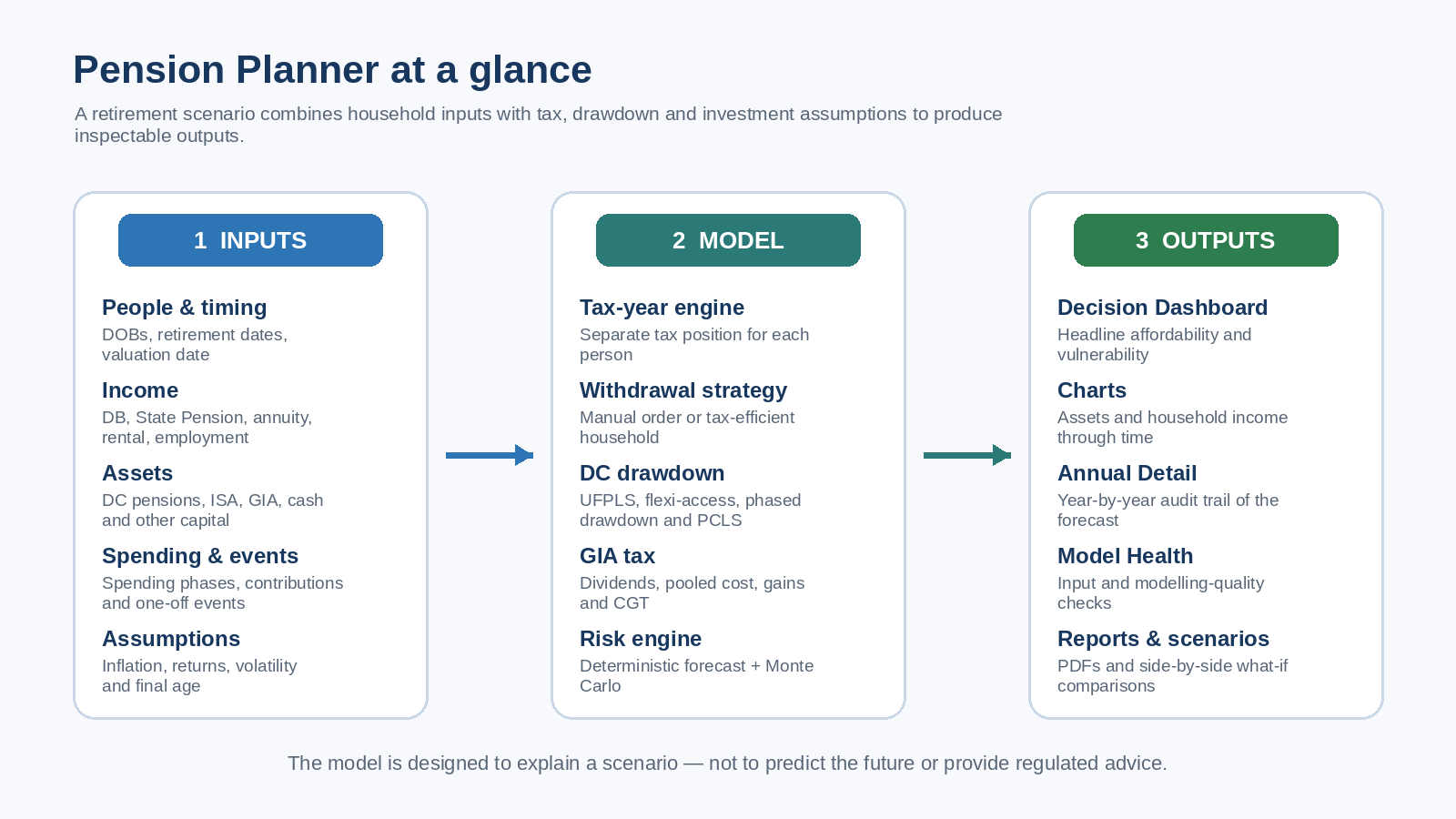
Common Model Health messages and how to resolve them
Model Health looks for missing, internally inconsistent or potentially misleading inputs. A warning does not necessarily mean your scenario is wrong: some messages simply identify assumptions that deserve a deliberate review.
Spending and forecast horizon
No household spending has been entered
Why it appears: A retirement forecast cannot test affordability unless there is a household spending requirement.
How to resolve it: Add at least one Household spending phase. If spending changes later in retirement, add additional phases rather than trying to represent the whole retirement with one number.
There is a gap between household spending phases / spending stops before the forecast ends
Why it appears: One or more years or dates in the forecast are not covered by a spending phase. This can make later asset balances look artificially strong.
How to resolve it: Adjust the end of the earlier phase and the start of the next phase so spending is continuous, or add a phase for the intervening period. Extend the final phase if spending is intended to continue to the end of the forecast.
Household spending phases overlap
Why it appears: Two spending targets apply to the same age or date range.
How to resolve it: Adjust the phase boundaries so only one household spending target applies at any point in time.
Forecast ends before age 90
Why it appears: A shorter forecast can understate longevity risk by stopping before a potentially long retirement has finished.
How to resolve it: Consider extending Forecast assumptions → Forecast horizon to at least age 90, and potentially beyond that if you want a more conservative longevity test.
Tax-Year Precision and income
Tax-year precision is enabled but incomplete
Why it appears: Exact tax-year modelling requires a valuation date and dates of birth for both people. If these are missing, Pension Planner cannot place events reliably into 6 April–5 April tax years.
How to resolve it: Complete People & retirement and Tax-year precision, including the valuation date and both dates of birth.
Stored ages do not match the dates of birth
Why it appears: The age implied by a date of birth at the valuation date differs from the older age field held in the scenario.
How to resolve it: Open People & retirement and re-save the dates of birth or valuation date. Exact forecasts use the DOB-derived ages.
First tax year starts part-way through with no year-to-date taxable income entered
Why it appears: If your valuation date is after 6 April, some Personal Allowance or tax-band capacity may already have been used earlier in that tax year.
How to resolve it: Review Tax-year precision → First tax-year context and enter taxable income already received since 6 April where appropriate.
No State Pension is entered for one of the people
Why it appears: State Pension is often a significant source of guaranteed later-life income, so omitting it can materially distort the forecast.
How to resolve it: Add a State Pension income stream for that person if they are expected to receive one. Check the amount, starting age/date and growth assumption.
State Pension, annuity or rental income is marked non-taxable
Why it appears: Pension Planner normally expects these income types to occupy the individual owner's Personal Allowance and tax bands.
How to resolve it: Review the real-world tax treatment of the income and switch Taxable on where appropriate. A deliberate exception can be left in place, but the warning is a prompt to confirm the choice.
Income Tax is switched off
Why it appears: Ignoring UK Income Tax can materially overstate net retirement income and understate the pension withdrawals required to fund spending.
How to resolve it: Enable UK Income Tax unless you are deliberately running a pre-tax comparison scenario.
Pensions and withdrawals
Automatic household tax optimisation is not enabled
Why it appears: The scenario is using Manual asset order rather than the Tax-efficient household strategy.
How to resolve it: This is a note rather than an error. If you want Pension Planner to compare household funding sources and individual tax positions automatically, select Inputs → Withdrawal strategy → Tax-efficient household.
Automatic crystallisation is paired with Manual asset order
Why it appears: Optimised model-generated crystallisation is designed to work with the Tax-efficient household withdrawal strategy.
How to resolve it: Either switch the household withdrawal strategy to Tax-efficient household or replace automatic crystallisation with manually entered crystallisation events.
A crystallisation event occurs before pension access
Why it appears: A DC pension crystallisation has been scheduled before the asset's modelled access age or exact access date.
How to resolve it: Move the crystallisation event to an accessible age/date, or correct the pension's access age if the input itself is wrong.
Crystallised pension exceeds total pension balance
Why it appears: The amount entered as already crystallised drawdown is greater than the total current DC pension balance.
How to resolve it: Correct either the current pension balance or the crystallised-balance input so the crystallised amount does not exceed the total pension.
Lump Sum Allowance is negative or above the standard amount
Why it appears: A negative remaining allowance is inconsistent with the model. A value above the standard £268,275 allowance may be legitimate where protected lump-sum rights apply, but it deserves confirmation.
How to resolve it: Review People & retirement → remaining Lump Sum Allowance. Correct an accidental value, or retain a higher figure only if you deliberately want to model protected rights.
Possible MPAA contribution conflict
Why it appears: After flexible pension access, planned plus entered year-to-date DC contributions exceed the modelled £10,000 Money Purchase Annual Allowance threshold.
How to resolve it: Check the timing of flexible pension access and the contribution schedule. Pension Planner flags the possible conflict but does not calculate an Annual Allowance tax charge, so obtain current tax guidance if this could apply in practice.
GIA, annuity and rental-property inputs
A GIA needs an individual owner
Why it appears: Dividend tax and Capital Gains Tax are calculated per person, so Pension Planner cannot reliably allocate a jointly owned GIA without knowing the beneficial ownership split.
How to resolve it: Split the holding into one GIA for each beneficial owner, using the appropriate share of current market value and pooled acquisition cost for each person.
GIA pooled acquisition cost is above market value
Why it appears: This represents an unrealised loss. It can be perfectly valid, but it materially affects future CGT estimates.
How to resolve it: Check the pooled cost basis against your records. If the investment genuinely has an unrealised loss, no correction is required.
An annuity needs an individual owner
Why it appears: Annuity income is taxed on the individual receiving it, so a jointly assigned stream cannot be placed accurately into each person's Personal Allowance and tax bands.
How to resolve it: Assign the annuity to the person who receives the income.
Rental property income needs an individual owner
Why it appears: Pension Planner calculates Income Tax separately for each person rather than as a single household taxpayer.
How to resolve it: For jointly owned property, create separate rental-income streams for each person using the appropriate taxable ownership shares.
Rental expenses exceed gross rent
Why it appears: The entered expenses create a property loss. Pension Planner floors taxable property profit at £0 for that period and does not carry the loss forward into later tax years.
How to resolve it: Check the gross-rent and allowable-expense inputs. If a genuine tax loss exists, verify its real tax treatment separately and model future taxable profit appropriately.
Assumptions, Monte Carlo and affordability
Investment-return, inflation or volatility assumption is unusually high or low
Why it appears: Model Health highlights assumptions that may produce unusually optimistic, pessimistic or unrepresentative long-term results.
How to resolve it: Confirm that the assumption is deliberate, then create comparison scenarios using more conservative and more optimistic values. The purpose of the warning is sensitivity testing, not to prescribe a single 'correct' assumption.
Monte Carlo is disabled or the path count is low
Why it appears: A deterministic forecast assumes a smooth annual return and does not show sequence-of-returns uncertainty. A very small Monte Carlo sample can also give less stable results.
How to resolve it: Enable Monte Carlo if you want a resilience check. Pension Planner suggests around 1,000 paths while analysing and 5,000 for a final sensitivity check if device performance allows.
A capital event falls outside the forecast
Why it appears: The event occurs before the model begins or after the selected forecast horizon, so it cannot affect the displayed forecast.
How to resolve it: Correct the capital-event age/date or extend the forecast horizon if the event should be included.
The average-return path has an unfunded shortfall
Why it appears: In at least one modelled year, household cash requirements cannot be fully met from income and accessible assets even on the deterministic average-return path.
How to resolve it: Start with the first year showing the shortfall in Annual Detail. Then review spending, retirement timing, pension-access dates, available assets, contribution assumptions and any missing income. Do not rely on balances shown after an unfunded shortfall without understanding what caused it.
No. “No material issues found” means the automated checks did not identify obvious data-quality problems. It does not mean the assumptions are suitable, the forecast is certain or the retirement plan is guaranteed to succeed. Compare scenarios and review the underlying assumptions before making real financial decisions.
Common technical checks
A forecast result looks unexpected
Review Model Health first, then inspect Annual Detail from the first tax year in which the result changes materially. Check income ownership, asset access ages, spending phases, capital events, tax settings and planned contributions.
Mac and iPhone show different scenarios
The app does not automatically synchronise scenario libraries between devices. Use the manual backup/export and import workflow when you intentionally want to transfer the complete scenario library.
A tax result looks surprising
Check the selected tax region for each person, taxable flags, year-to-date context in the first partial tax year, pension access strategy and any GIA cost-basis/dividend inputs. Pension Planner is a planning model rather than a complete tax-return engine.
Still need help?
Email support@pensionplannerapp.co.uk. A screenshot of the Model Health message is normally more useful than sending detailed financial data.