UK retirement modelling for individuals and couples

See the retirement plan. Test the decisions behind it.

Pension Planner brings pensions, investments, tax, spending and future events into one coherent household forecast. Start with the essentials, then add tax, drawdown and resilience detail when you need it.
Planning tool, not financial advice. Pension Planner explores scenarios using assumptions you choose. Outputs are illustrative modelling results, not a recommendation that any particular pension, investment, withdrawal, transfer or tax action is suitable for you. Read the full disclaimer
iPhone + iPad + MacNative layouts for each screen size
Simple by defaultOptional detail stays optional
Privacy-firstScenario data stays local by default
Tax-awareHousehold withdrawal modelling
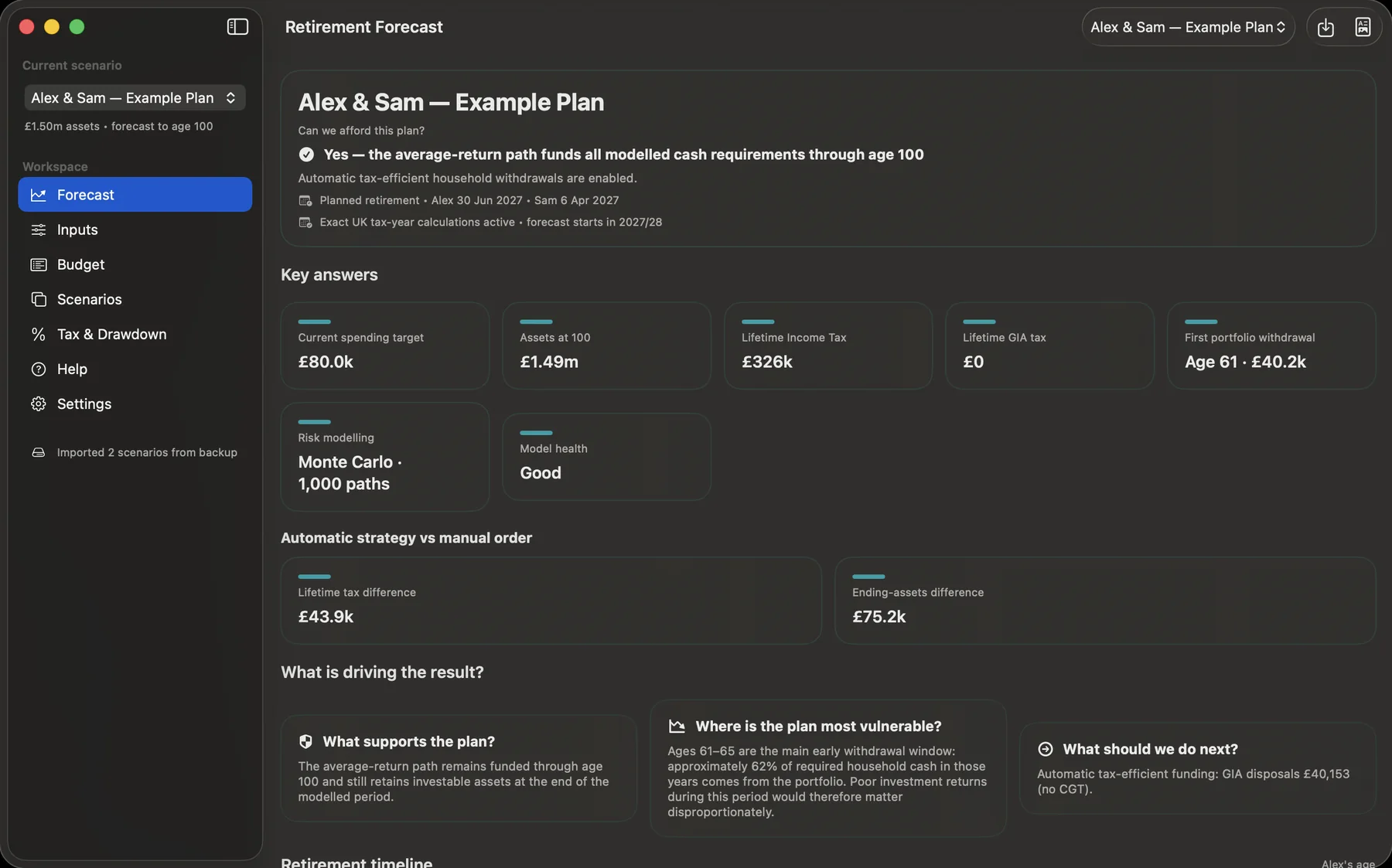
Pension Planner Mac dashboard showing a fictional Alex and Sam retirement scenario with headline result, spending target, tax, assets and retirement dates.
Answer first: see whether the plan funds the modelled spending, then inspect the assumptions and trade-offs behind the result.
A clearer first run

Start simple. Add detail when you need it.

A useful retirement forecast can be built from a small set of understandable inputs. Tax-year precision, crystallisation, capital events and other specialist controls remain available without getting in the way.
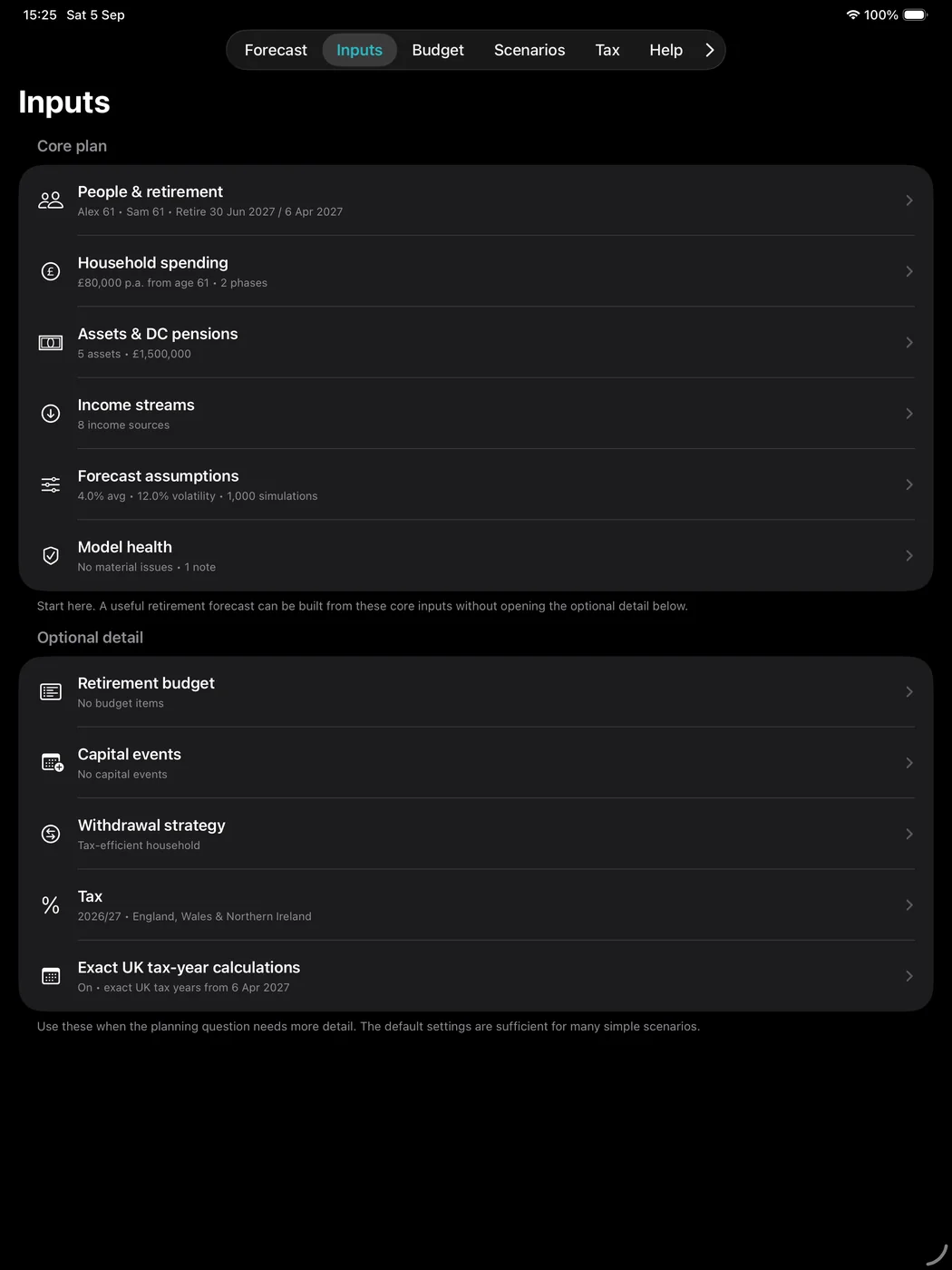
Pension Planner on iPad showing Core plan inputs and Optional detail for a fictional Alex and Sam scenario.

Core plan first

  • People and planned retirement dates.
  • Household spending.
  • Assets and DC pensions.
  • Income streams.
  • Forecast assumptions.
  • Model Health checks.

Advanced features are progressively disclosed rather than forcing every user through a complex setup process.

Forecast

See income, spending and assets over time

Pension Planner keeps the main forecast in today’s money so the spending path remains understandable, while also showing the future-pound view when you want to see the nominal scale of later cash flows.
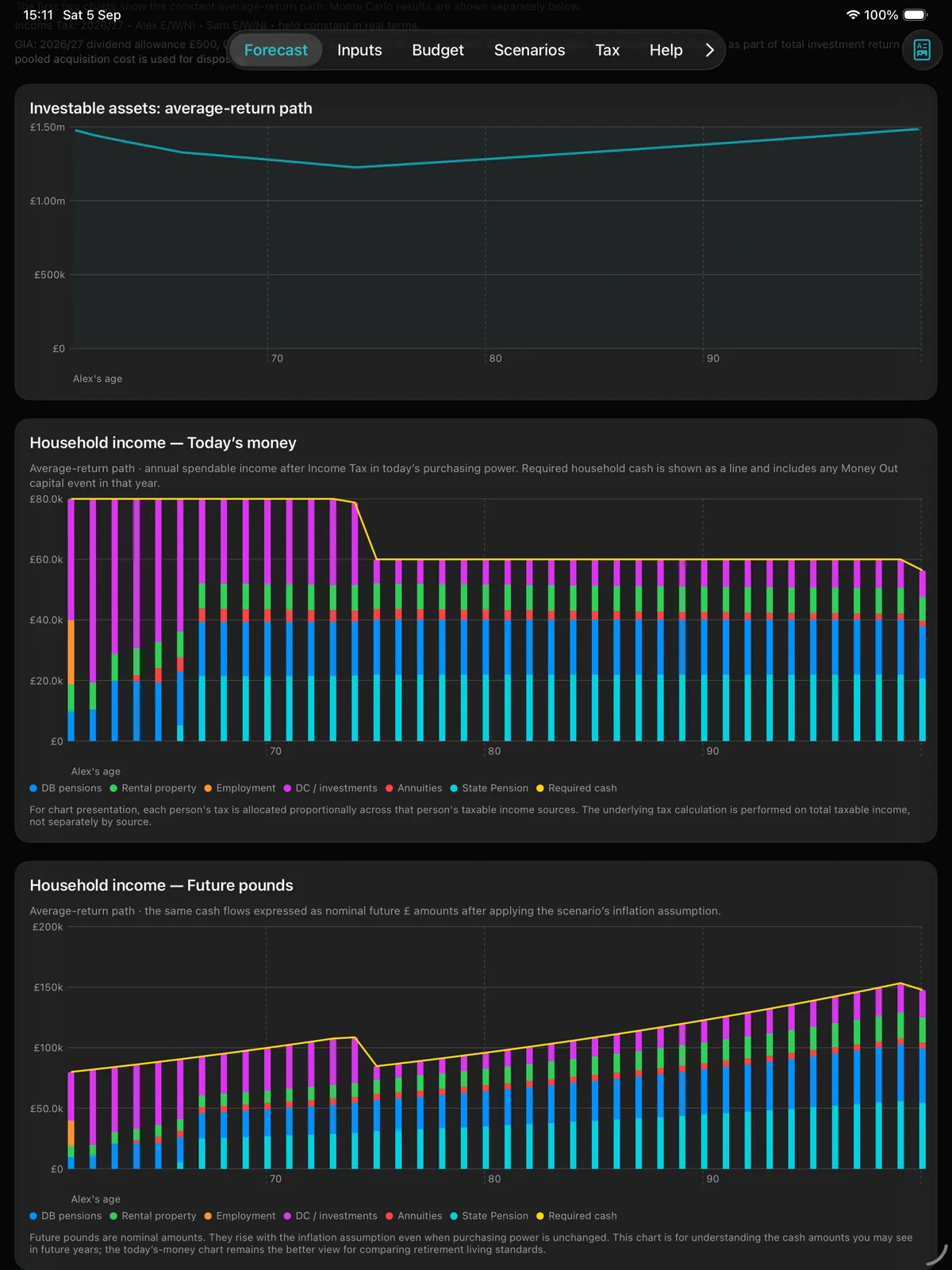
Pension Planner iPad forecast showing investable assets, household income in today's money and future pounds for the fictional Alex and Sam scenario.
The iPad forecast uses the larger screen to show more of the retirement picture at once.
Tax-aware funding

Compare withdrawal strategies, not just balances

Pension Planner treats retirement spending as a household requirement while keeping UK tax ownership individual. The automatic strategy compares modelled funding routes across partners and account types; it does not assess whether a route is suitable for an individual user.
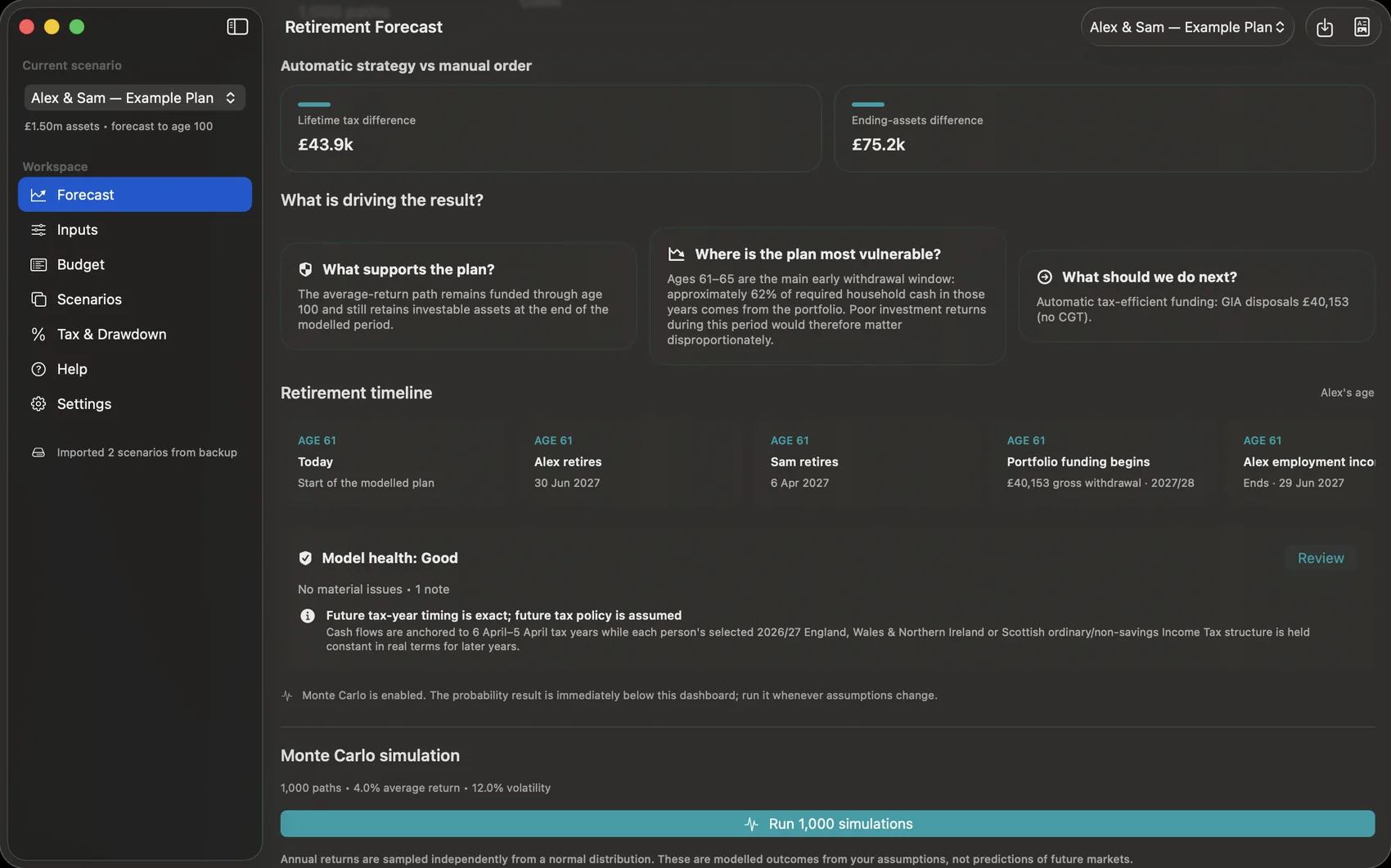
  • Compare automatic tax-efficient funding with manual asset order.
  • Model pensions, tax-free capital and taxable General Investment Accounts separately.
  • Show the tax and ending-asset difference between strategies.
  • Explain what is supporting the plan and where it is vulnerable.
Pension Planner Mac tax-efficient withdrawal comparison showing lifetime tax and ending asset differences for a fictional scenario.
Illustrative outputs. Tax, withdrawal and spending results depend on the data and assumptions entered and on simplified modelled rules. Actual tax, provider terms and investment outcomes can differ. Check current rules and provider information before acting on a material decision.
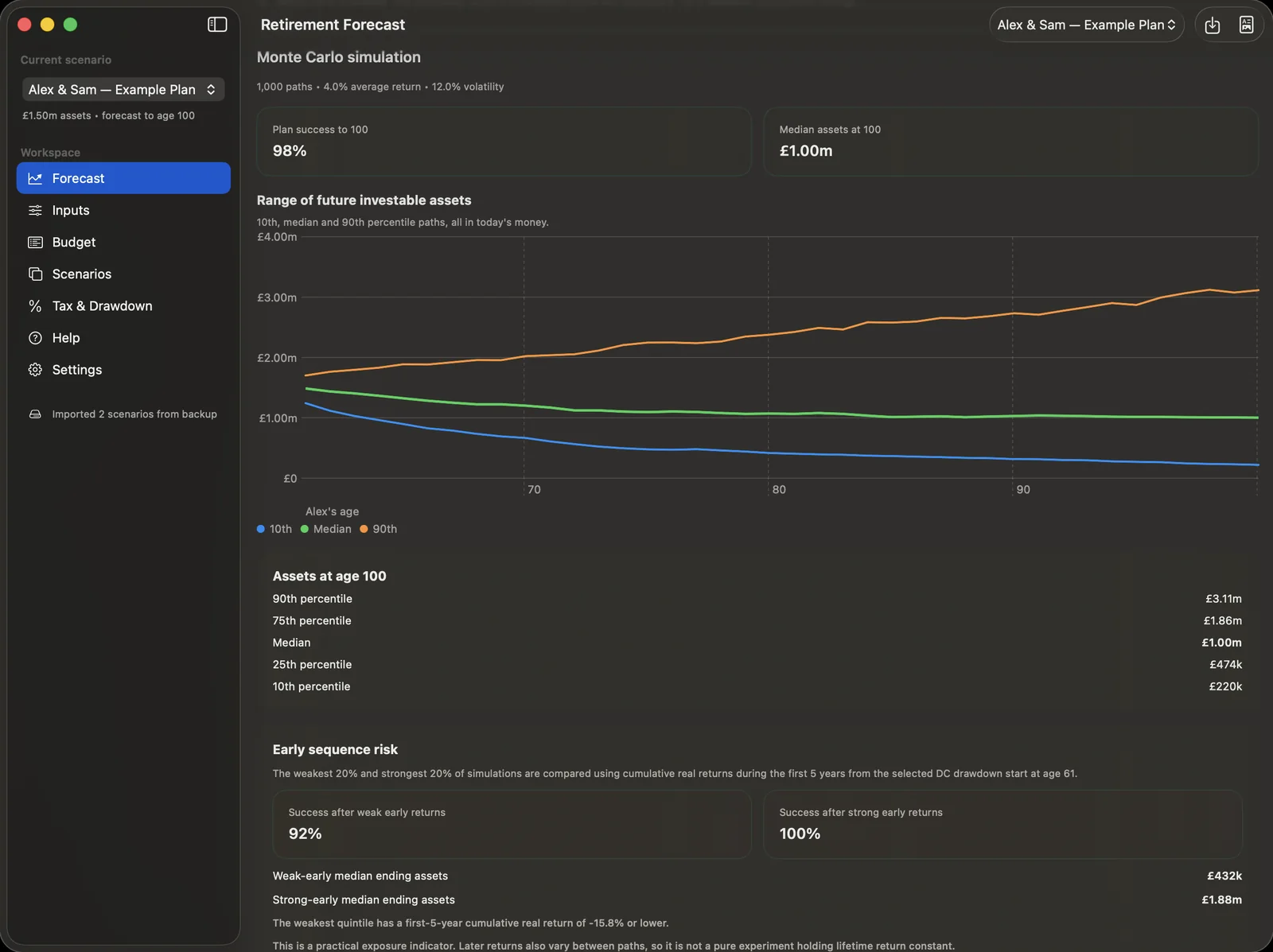
Pension Planner Mac Monte Carlo analysis showing plan success, percentile asset paths and early sequence risk.
Resilience

Stress-test the plan, including sequence risk

A single average-return path is useful, but it is not the whole story. Monte Carlo analysis shows how the plan behaves across many simulated investment paths and highlights the impact of weak or strong returns early in retirement.

Monte CarloProbability-based outcomes
PercentilesDownside, median and upside paths
Sequence riskWeak versus strong early returns
Sustainable spendingTest a chosen confidence target
What-if planning

Duplicate a scenario and change one decision at a time

Retirement planning is rarely about one forecast. Scenario copies make it easier to compare different retirement dates, spending plans or assumptions without losing the original baseline.
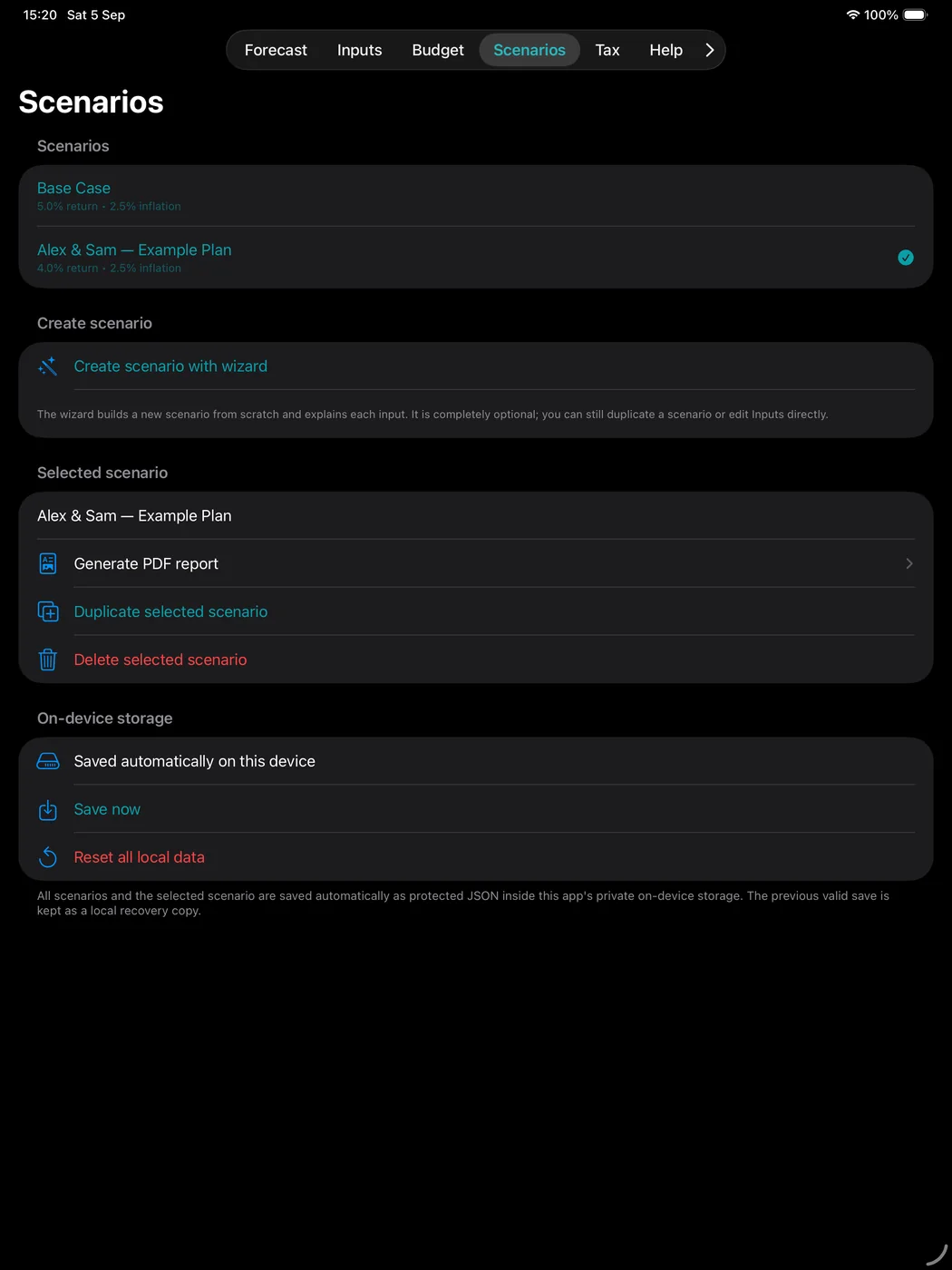
Pension Planner iPad Scenarios screen showing multiple retirement planning scenarios for comparison.

Useful questions to test

  • What if we retire six or twelve months later?
  • What if spending falls later in retirement?
  • What if investment returns are lower?
  • What if one partner takes more taxable pension income?
  • How does a tax-efficient strategy compare with manual withdrawals?
Detailed analysis

Go deeper when the detail matters

On Mac, Annual Detail uses the wider screen to show income and tax alongside portfolio funding and closing assets. Specialist pension detail remains available without dominating the main annual cash-flow story.
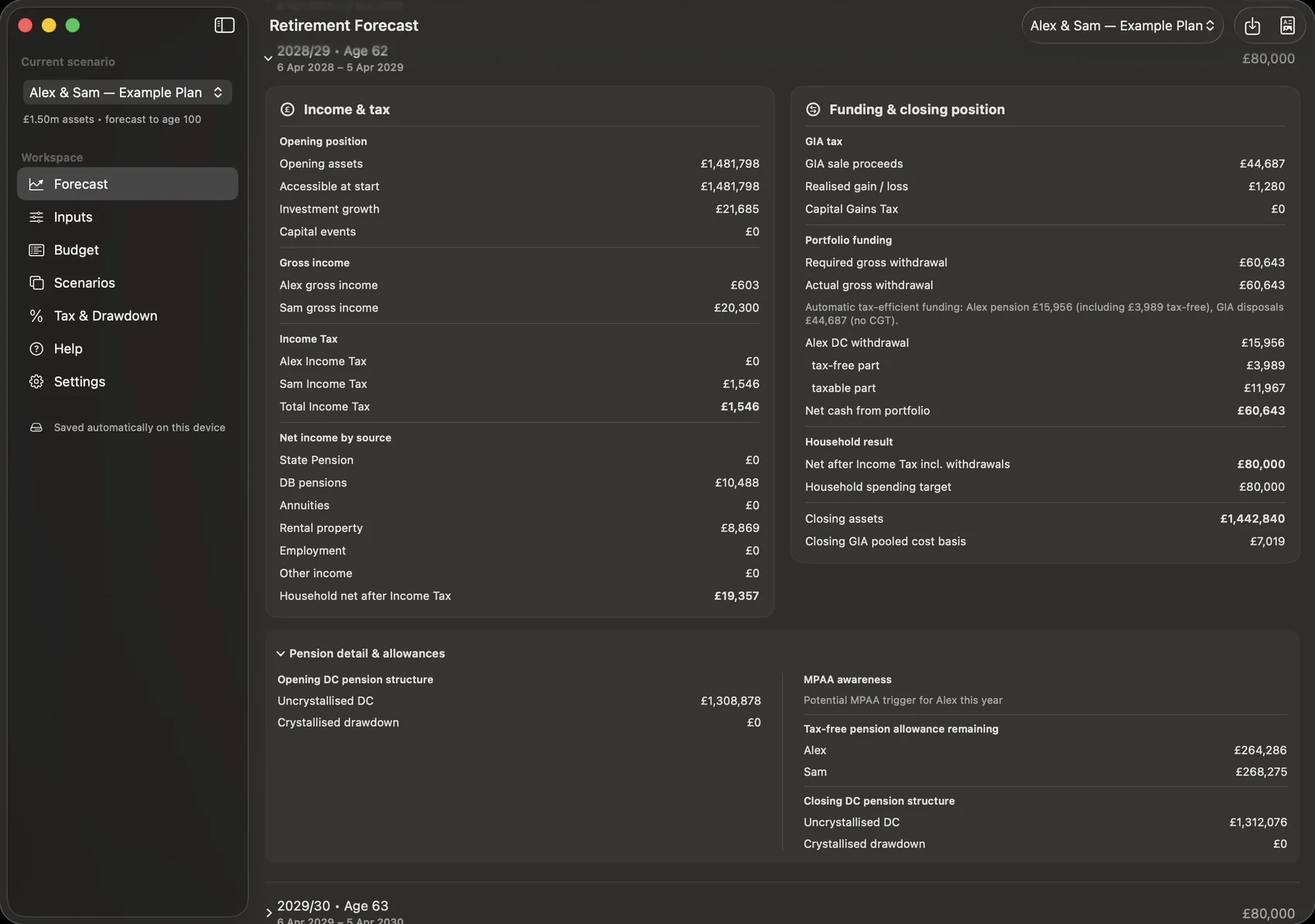
Pension Planner Mac two-column Annual Detail view showing income and tax beside GIA, portfolio funding and closing assets.
Annual Detail is designed to make the mechanics behind a forecast inspectable rather than hiding them inside a black-box result.

One model for the main retirement decisions

Pension Planner is a what-if modelling tool rather than a recommendation engine. Build a base case, understand the mechanics, then test alternatives.

£

Pensions and income

Model DC pensions, DB pensions, State Pension, annuities, employment income, rental-property income and other recurring income.

T

Tax-aware withdrawals

Compare manual funding with a tax-efficient household strategy that considers both partners, pension tax, tax-free capital and GIA tax effects.

G

GIA modelling

Track taxable General Investment Accounts with pooled acquisition cost, dividend tax, realised gains and modelled Capital Gains Tax.

↗

Monte Carlo analysis

Stress-test retirement funding across many simulated return paths and explore sequence-of-returns risk.

◎

Maximum Sustainable Spending

Estimate a modelled earlier-retirement spending level consistent with a chosen success target and the assumptions entered.

▦

Exact UK tax-year calculations

Use dates of birth, valuation dates and exact event dates to place income, contributions and withdrawals into UK tax years.

How Pension Planner works

The modelling engine combines household inputs, tax rules and planning assumptions year by year, then turns the result into dashboards, detailed cash flows and decision-support outputs.
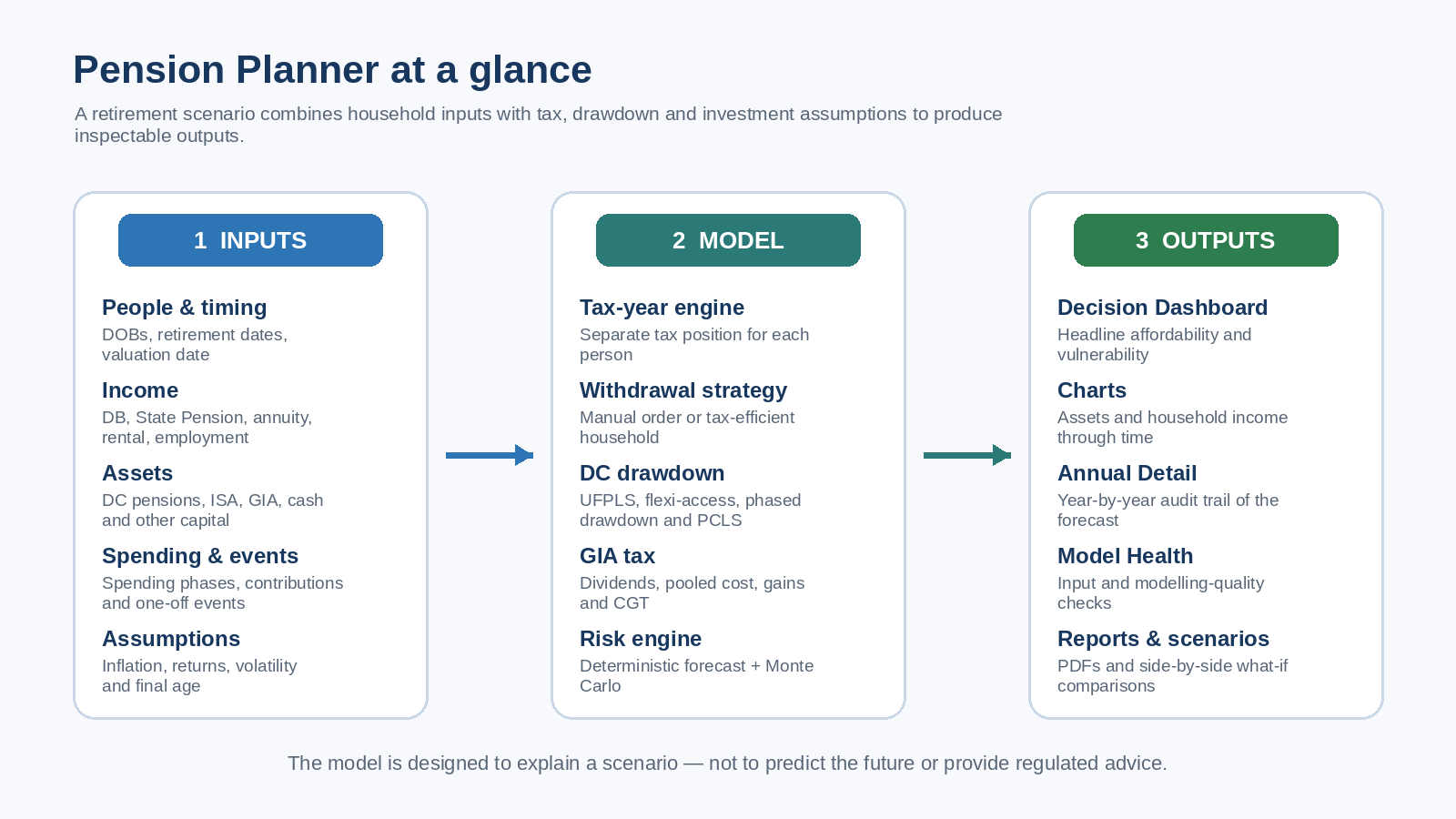
Overview diagram of Pension Planner workflow from inputs to outputs.
This overview shows how inputs, assumptions and modelling logic feed the forecast and decision-support outputs.

Typical workflow

  • Enter one or two people and planned retirement dates.
  • Add pensions, investments, GIAs, annuities, rental income and other recurring income.
  • Set spending, inflation, investment assumptions and any one-off capital events.
  • Review Forecast, Model Health, Monte Carlo and Annual Detail.
  • Duplicate the scenario to compare alternatives.

General Investment Account modelling

Pension Planner models a GIA explicitly, including annual dividends, pooled acquisition cost, disposals, realised gains and modelled Capital Gains Tax.
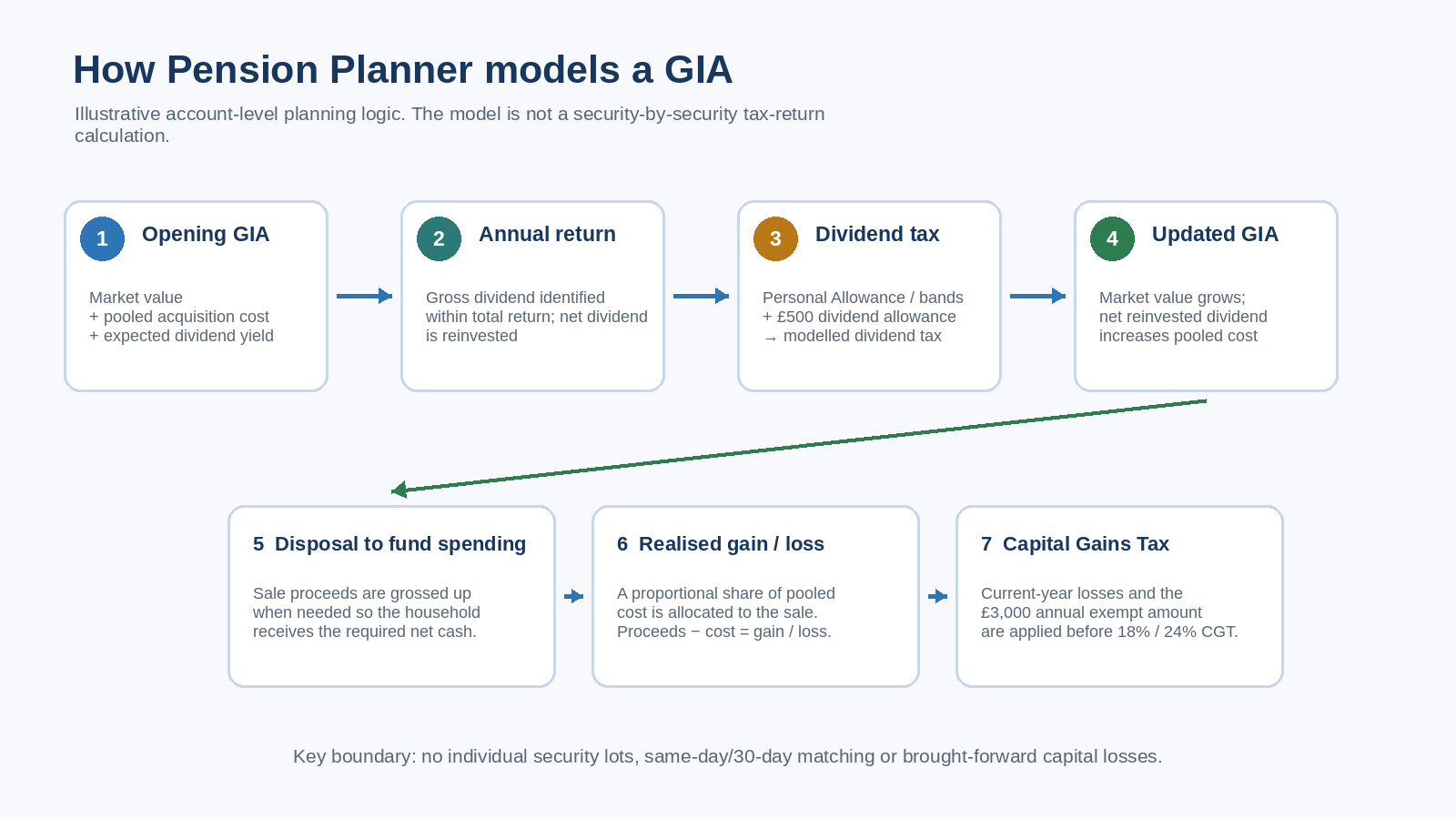
Diagram showing GIA lifecycle: opening balance, dividends, pooled cost, disposals, gains and capital gains tax.
GIA tax lifecycle: the account is modelled separately from ISAs and pensions because the tax treatment is different.
Before acting on a result

Use the model to explore decisions, not to replace professional judgement

Pension Planner cannot know every feature of a pension arrangement, investment, tax position or personal circumstance. For material decisions, verify the underlying data, check current HMRC and provider rules, and consider appropriate regulated financial or tax advice.

Read the full disclaimer →

Need help?

Visit Support for troubleshooting, Model Health guidance, feedback and contact information.

Support

How is my data handled?

Read the privacy and local-data explanations before using or sharing sensitive retirement scenarios.

Data & Security